Genesys Cloud - Main

 View Only

Sign Up

  • 1.  Count Answered Voice calls in terms of preview campaign

    Posted yesterday

    Hello,

    It seems there is not an easy way to count how many calls were actually answered in terms of preview campaign dialing.

    When i execute a preview campaign, agent receives and accepts a preview (callback) interaction. Let's assume that he dials out the call and customer answers. This is an answered outbound call made in terms of a callback interaction under the campaign's queue.

    The problem is when i am viewing queue performance statistics, i can see that voice answered statistic does not include this call. I get only metrics for callback interactions.

    Can you help?

    Best Regards,

    Orestis Dimitropoulos


    #Reporting/Analytics

    ------------------------------
    Orestis Dimitropoulos
    ------------------------------


  • 2.  RE: Count Answered Voice calls in terms of preview campaign

    Posted yesterday
    • Hello @Orestis Dimitropoulos

      In Queue Performance views, there's an important limitation regarding media type filtering: you cannot select voice and callback types simultaneously. When you filter by media type in Queue Performance statistics, selecting voice automatically deselects the callback option, and vice versa.

      Since preview campaigns create callback interactions (which the agent accepts before dialing), the system tracks these as callback media type rather than voice media type, even after the agent dials out and connects with the customer.

      Maybe other reports could help.

      - Use Campaign Performance Views Instead:

      The Campaign Performance Detail view shows comprehensive interaction statistics, wrap-up call details, and both live and historical interactions specifically for your campaign

      This view provides better visibility into preview campaign activity than queue-based reporting

      - Use Historical Reports:

      The Dialer Campaign Detailed Attempts History report displays outbound interaction attempts for campaigns, including information about when customers answer calls

      The Dialer Campaign Success Results reports show contact rates and detailed metrics about answered calls

      - View Campaign Interactions Detail:

      Access Campaign Interactions Detail view to see a list of interactions specific to your preview campaign

      This provides interaction-level visibility that may not appear correctly in queue-focused views


    ------------------------------
    Arthur Pereira Reinoldes
    ------------------------------


  • 3.  RE: Count Answered Voice calls in terms of preview campaign
    Best Answer

    Posted yesterday

    Hi @Orestis Dimitropoulos@Orestis Dimitropoulos great breakdown from Arthur. I have not run preview campaigns in a while myself, but I dug up some data from about two years ago, and it actually tells us exactly what you need to know, so hopefully this helps.

    The short version is that in preview campaigns, the Call Analysis Result is empty in the export since the agent is the one placing the call manually, not the dialer engine. So filtering by that column will not work for "preview dialing" the way it does for progressive or predictive campaigns.

    What worked for me is pulling the Campaign Interactions Detail view Arthur mentioned. To get there, go to Menu > Analytics > Analytics Workspace, search for Campaign Performance in the Default section, open it, find your campaign, and click it to open Campaign Performance Detail, then click the Interactions tab at the top. Make sure you select All Interactions, not just voice, since every preview interaction is tracked as callback media type regardless of what happens on the call.

    Once you are in that view, click Export in the top right and select Detailed Attempt History. The columns that actually tell you whether a call was answered are these:
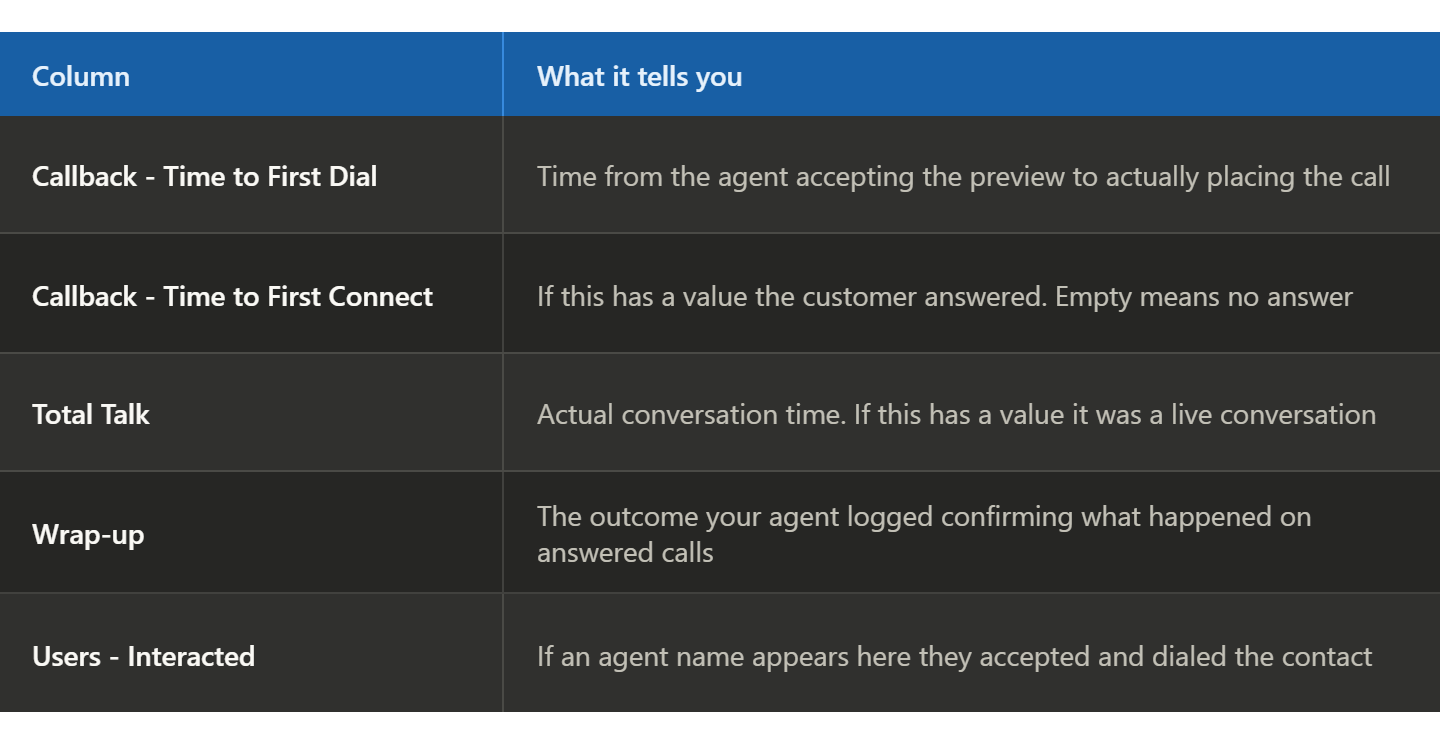
    Filter for rows where Callback - Time to First Connect AND Total Talk both have values, and that is your answered call count.

    For contacts that were not answered, there are two distinct scenarios worth knowing about. If Callback - Time to First Connect and Total Talk are both empty, the agent dialed, but nobody picked up. If Wrap-up shows ININ-OUTBOUND-PREVIEW-SKIPPED, the agent pressed skip before ever dialing at all. Both show up as non-answered, but for different reasons, which can be useful if you need that level of detail in your reporting.

    For a quick top-level number without diving into the export, the Campaign Connect Rate column in the Campaign Performance Summary view gives you the answered percentage at the campaign level. Hope that helps, turns out two-year-old data still comes in cluth!


    ------------------------------
    Chris Rodriguez
    Contact Center System Administrator
    ------------------------------