Hi james,
thanks for the explanation there is just one thing that i am questionning.
About the "Not Responding" Message
Some agents are now seeing "Not Responding."
This message usually means:
- The Persistent Connection temporarily dropped, or
- The system couldn't establish that connection yet.
This does not mean the agent missed a customer call.
Nothing shows in the "missed interactions" list because the system was only trying to set up the agent's connection - not deliver a customer call.
Why this message is safer
Before this update:
- Agents didn't know if their connection dropped.
- Problems only appeared when a call came in or the call disconnected.
Now:
- The system warns the agent early.
- It prevents a bad connection from affecting a real customer call later.
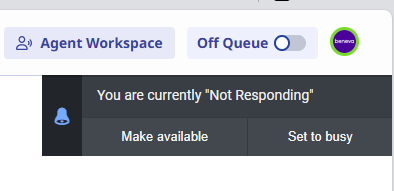
My probem is with this section. For agents that are not taking calls one after the other, if they don't click the button they will not receive further calls. Before, if the agent was not on call and the connection drop for a sec, the agent was able to receive call when the call arrived. Now if they get the message, they are automaticly Not responding i.e. not receiving calls. If they work on somehing else, they might miss the info and stay in not responding for a long time.
I also would like to recommend you for the writing of the Release Notes at Genesys, I think you would do a terrific job! ;)
We have disabled this fucntion because we where getting a lot's of bugs tickets from the agents and did not see any real custommer experience gains.
We are waiting to see what is the next developpement from Genesys on this.
Thanks
Simon
------------------------------
Simon Dufour
------------------------------
Original Message:
Sent: 02-24-2026 12:02
From: James Dunn
Subject: Persistent Connection + Media Recovery
This is what we sent to our team leaders. It would be good to hear from someone at Genesys to confirm our understanding is correct:
--
Simplified Explanation of the New Genesys WebRTC Updates
Genesys has released two updates that improve how the softphone (WebRTC) works for agents:
- A new type of connection called an "Active Persistent Connection"
- A new feature called "Media Recovery"
1. Active Persistent Connection (New) (when NOT in a call)
What this means in plain language:
This update makes sure the agent's phone connection to Genesys is set up before they get their first call - not during.
What used to happen
- The system only created the connection when the agent received their first call.
- Because of this, the first call could be slow to answer or even fail (e.g., answer button not responding).
- The connection would stay active for a set amount of time (10 minutes for most users, 2 hours for some at <<PARTNER>>).
- If that connection timed out or the network dropped, a new connection wasn't made until the next call came in.
What happens now
- As soon as an agent logs into Genesys (or returns from lunch/break), the connection is created right away.
- If this connection drops, Genesys automatically tries to rebuild it.
- This means fewer delays when answering calls and fewer connection issues mid‑call.
2. Media Recovery (New) (when in a call)
What this means in plain language:
If the audio connection between the agent and customer is briefly interrupted, Genesys now tries to fix the call instead of dropping it immediately.
Before
- If the audio stream broke (Wi‑Fi hiccup, brief network blip), the call ended automatically.
Now
- Genesys gives itself time to recover the audio connection.
- This means fewer sudden dropped calls for agents and customers.
About the "Not Responding" Message
Some agents are now seeing "Not Responding."
This message usually means:
- The Persistent Connection temporarily dropped, or
- The system couldn't establish that connection yet.
This does not mean the agent missed a customer call.
Nothing shows in the "missed interactions" list because the system was only trying to set up the agent's connection - not deliver a customer call.
Why this message is safer
Before this update:
- Agents didn't know if their connection dropped.
- Problems only appeared when a call came in or the call disconnected.
Now:
- The system warns the agent early.
- It prevents a bad connection from affecting a real customer call later.
------------------------------
James Dunn
Telecoms Specialist
------------------------------
Original Message:
Sent: 02-24-2026 11:51
From: Christine Serapiglia
Subject: Persistent Connection + Media Recovery
We also enabled Modern WebRTC and active persistent connection and we have a couple reports of users being presented with a Not Responding notification but they were not presented with an inbound ACD interaction. Opened a support case and of course they want us to duplicate and provide logs and video of what is happening. Has anyone else experienced this with Modern WebRTC enabled? trying to determine if we should deactivate it in the org as maybe it is not fully production ready yet? Thanks
Christine Serapiglia
Amica Insurance
Voice Operations Specialist
------------------------------
Christine Serapiglia
javascript:AddSignatureVariable('Amica Mutual Insurance Co.');
javascript:AddSignatureVariable('Senior Voice Analyst');