Genesys Cloud - Main

 View Only

Sign Up

  Thread closed by the administrator, not accepting new replies.
  • 1.  Requesting assistance with Audit Viewer

    Posted 08-19-2025 11:57
    No replies, thread closed.

    Hi there!

    I'm trying to investigate if one of our agents is removing queues on his own.  When I go to the Genesys KB's for Audit Viewer, I see this article.  However, I don't see the fields it lists when I click for details.  I see these:

    There are some changes I know weren't this agent, when queues were added back to their account, but the User name / user id remains the same in all of them.  Am I missing something?  How can I track who exactly made the change?

    Thanks in advance for your help!


    #Reporting/Analytics
    #Unsure/Other

    ------------------------------
    Brian Mathews
    ------------------------------


  • 2.  RE: Requesting assistance with Audit Viewer
    Best Answer

    Posted 08-19-2025 12:13
    No replies, thread closed.

    Hello Brian,

    You're on the right track. Our Audit Viewer is a pretty powerful tool to track the changes that happen within the organization. While I can't comment on which objects may have been changed by who based on your screenshot, if you reach out to Product Support, they should be able to track down which user made changes in the organization. 


    ------------------------------
    Jason Kleitz
    Online Community Manager/Moderator
    ------------------------------


  • 3.  RE: Requesting assistance with Audit Viewer

    Posted 08-20-2025 09:12
    No replies, thread closed.

    I have trouble with this tool as well and I am wondering if this is still the right directions for this because the view has recently changed and for me, no longer looks like the screen shot in the directions in Genesys.    Minor issue, but I also do not have a way to get to a small version of the Audit Viewer, than I can see and I do not see an audits footer.   Can you provide screenshots on that?    It is probably something I am missing, but would love to use this tool more often, I just do not find it very easy to use.


    ------------------------------
    Judy Jimenez, Call Center Operations Manager
    CURE Auto Insurance
    ------------------------------


  • 4.  RE: Requesting assistance with Audit Viewer

    Posted 08-20-2025 09:46
    No replies, thread closed.

    Hey Judy,

    You may want to make sure that you have the following permissions:

    • Audits > Audit > View permission

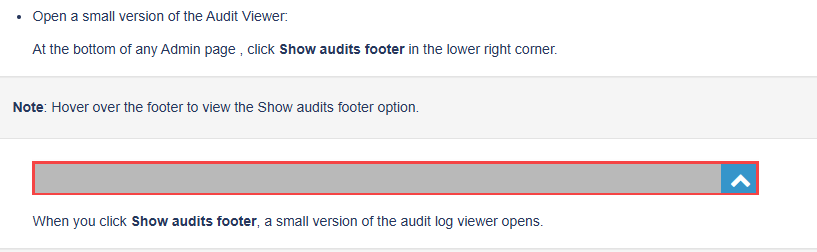
    I know that the documentation says 'At the bottom of any Admin page' but in my experience it doesn't show up on every category, but while in most of the Admin containers, you should be able to see the little blue rectangle in the bottom right corner.


    ------------------------------
    Jason Kleitz
    Online Community Manager/Moderator
    ------------------------------


  • 5.  RE: Requesting assistance with Audit Viewer

    Posted 08-20-2025 09:46
    No replies, thread closed.

    Hmmm...I still have the audits footer when I hover the cursor over the bottom gray area...

    Before hover

    After hover


    ------------------------------
    George Ganahl GCCX-AI, GCP, GCSME, ICCE, ICHD, etc.
    Technical Adoption Champion
    Genesys
    2024 Community Member of the Year
    ------------------------------


  • 6.  RE: Requesting assistance with Audit Viewer

    Posted 08-20-2025 09:29
    No replies, thread closed.

    Those are the fields named in the article...the article describes the fields, doesn't specifically name them:

    To view details of an event, click the event on the search results in the Audit Viewer. The Details window opens and you can view the following details:

    • Who or what performed the action: You can view whether an API or upstream service caused the action. A related link is available to indicate the causing event. You can also view if a user within the organization performed the action that caused an audit event. == User Name and User Id
    • RemoteIP: If a user generated an event, you can view the user's RemoteIP. == User IP
    • Property Changes: You can view the property values before and after the change. == Changed Properties table
    • Related events: You can view any related upstream or downstream events. == See related audits link at bottom


    ------------------------------
    George Ganahl GCCX-AI, GCP, GCSME, ICCE, ICHD, etc.
    Technical Adoption Champion
    Genesys
    2024 Community Member of the Year
    ------------------------------


  • 7.  RE: Requesting assistance with Audit Viewer

    Posted 08-20-2025 09:31
    Edited by George Ganahl 08-20-2025 09:48
    No replies, thread closed.

    Also note that if you are trying to see users being removed from the queue, it won't show when you filter for Member Update. You have to filter by Member Remove.

    You can ignore this rambling...I can see from your screenshots, now that I look closely, that you are probably looking at Activate/Deactivate behavior

    ------------------------------
    George Ganahl GCCX-AI, GCP, GCSME, ICCE, ICHD, etc.
    Technical Adoption Champion
    Genesys
    2024 Community Member of the Year
    ------------------------------


  • 8.  RE: Requesting assistance with Audit Viewer

    Posted 08-20-2025 09:42
    Edited by George Ganahl 08-20-2025 09:53
    No replies, thread closed.

    And...you mention the User name/User Id remain the same throughout...is that when you are filtering by Member Update? Did you try filtering on Member Remove instead to see if the agent's name shows up there for User Name?

    Also...is the agent removing himself from the queue, or just deactivating himself from the queue? I've been going down the Remove path...but if you really mean he's Deactivating himself then that would show up as Member Update...sorry if I confused things.

    Note: Looking back, it appears from your screenshots that you are looking at Deactivate behavior, so if the User Name doesn't show the agent...he probably didn't make the change. The User Name and User Id tells you who made the change.


    ------------------------------
    George Ganahl GCCX-AI, GCP, GCSME, ICCE, ICHD, etc.
    Technical Adoption Champion
    Genesys
    2024 Community Member of the Year
    ------------------------------